```html HIDE & SEAT — USELESS Project 3.0
HIDE & SEAT — CLASSROOM JOURNEY — USELESS 3.0
ThinkerHub — USELESS Project 3.0

HIDE
& SEAT 🪑👀

THE CLASSROOM HAS A SECRET.

“Where can you sit… and still get away with it?” 💀

BUILT BY

Sara & Darsana

Two students who noticed people hiding from the teacher… and decided to turn it into a project. 😭

📹 Camera Detection
🪑 Smart Seat Selection
📊 Visibility Scores
🎵 Musical Seat Chaos
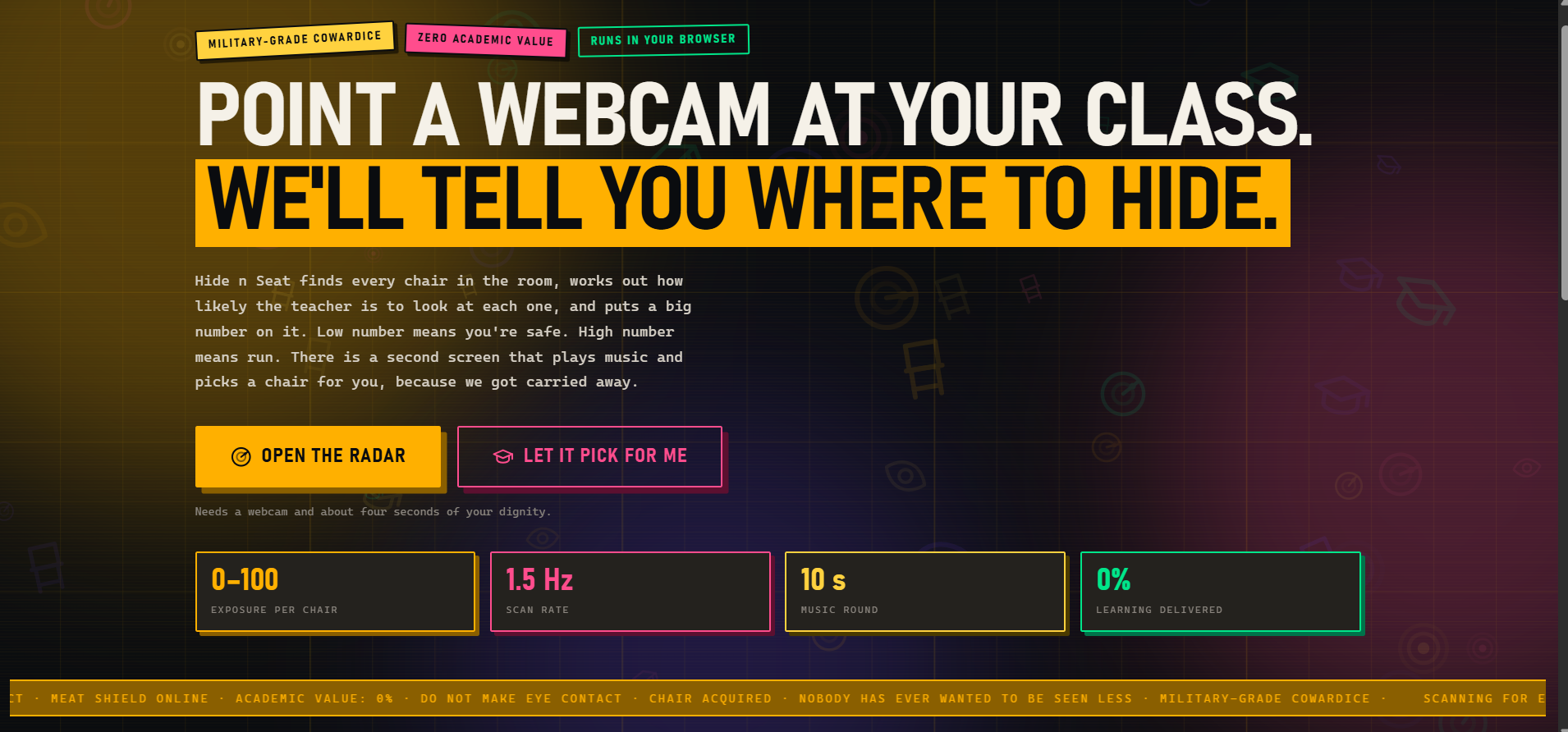
HIDE & SEAT landing screen
THE CLASSROOM LOGBOOK
WELCOME TO THE CLASSROOM.
CHOOSE YOUR SEAT WISELY.
THE CAMERA IS WATCHING. 👀
CLASSROOM 01 — GENESIS

It All Started in This Classroom…

This idea literally came from our own classroom — Sara and Darsana’s classroom. 😂

We noticed something happening right in front of us.

Some students had mastered the art of hiding from the teacher — sitting in those “safe” seats, ducking behind other students, and making sure they were just out of the teacher’s line of sight.

And we were like…

“Wait… why are some seats safer than others?” 👀

That random observation turned into a question:

“What if we could actually measure how visible a student is from the teacher’s position?”

And that’s where it all started.

No big research.
No complicated problem statement.

Just students hiding from the teacher in our classroom…

…and two of us thinking:

“Okay, this could actually be a project.” 💀
Live classroom visibility detection
THE ORIGINAL IDEA
CLASSROOM 02 — SCREEN 01

From a Classroom Observation to USELESS

Inspired by our classroom chaos, we decided to turn the teacher’s point of view into a camera. 📹

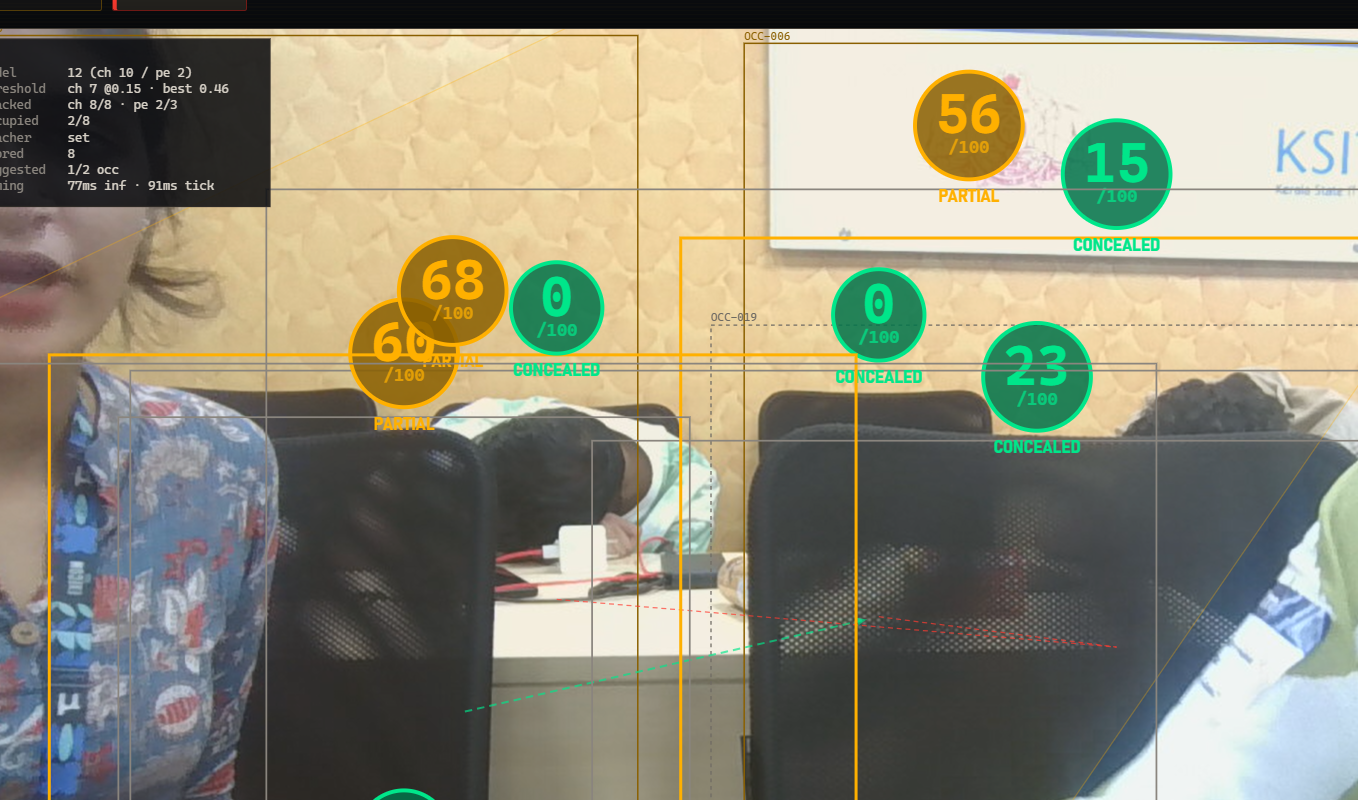
This screen shows exactly what the teacher would see from the front of the classroom — except the teacher has been replaced by a camera. 😭

The camera detects every student and gives them a Visibility Score out of 100.

Higher Score → More Visible → Easier for the teacher to spot 👀

Lower Score → Less Visible → Better chances of staying unnoticed 😎

So basically, the camera is doing what the teacher normally does:

Look around → Detect students → Judge their visibility → Give them a score. 💀

No teacher was required for this calculation.

THE CAMERA HAS OFFICIALLY
TAKEN OVER THE TEACHER’S JOB. 😂
CLASSROOM 03 — SCREEN 02

Musical Chairs, But Make It Suspicious 🎵🪑

Someone enters the classroom.

The camera detects them.

AND SUDDENLY…
🎵 MUSIC STARTS.

Welcome to our version of Musical Chairs — except this time, you’re not fighting for the last chair.

The system chooses one for you. 😭

The 10-Second Chaos

Once the camera detects you, a random song starts playing for 10 seconds.

While the music plays, the camera keeps tracking you.

Then…

⏱️ 10 seconds are up.

The system randomly assigns you a seat and shows:

🪑 Your Seat
📊 Visibility Score
💬 A message based on your seat

But wait…

“Do You Accept This Seat?”

YES ✅ → Congratulations. That’s your seat. Good luck. 💀

NO ❌ → Fine. We’ll try again.

The music starts again, the 10-second countdown begins, and the system gives you another random seat.

You can reject it one more time.

“Okay. Enough. Go sit there.” 😭

Because apparently, even choosing where to sit is now a technological decision.

CLASSROOM 04 — FAILURE ARC

Our Camera Was Not Camera-ing 📹💀

So… we had the idea.

We had the plan.

We had the confidence.

But our camera had absolutely no idea what was going on. 😭

When we first implemented the system, the camera was tiny, struggling, and barely detecting anything.

Students? Not detected. ❌
Seats? Sometimes detected. 🪑
Actual visibility? Good luck. 💀
“I’m here… but I’m not sure why.” 😭

Basically, we wanted a smart classroom vision system…

BUT OUR CAMERA WAS GIVING:
“TRUST ME BRO, I SAW SOMETHING.” 👀

That was our first big realization:

The idea was good.
The implementation… needed serious work.
CLASSROOM 05 — OVERENGINEERING ARC

We May Have Overdone It. 💀

After fixing the camera, we got a little too excited.

“Let’s add more features!”

So we kept adding.

And adding.

And adding…

Until our simple, silly USELESS project started looking like a professional educational platform. 😭

Suddenly, we had things that felt more like a quiz app than a project about finding the best seat to hide from a teacher.

“WAIT… THIS IS WAY TOO SERIOUS.” 💀

It was working, but it just didn’t feel like USELESS anymore.

So we did the most important thing:

WE DELETED IT. 🗑️
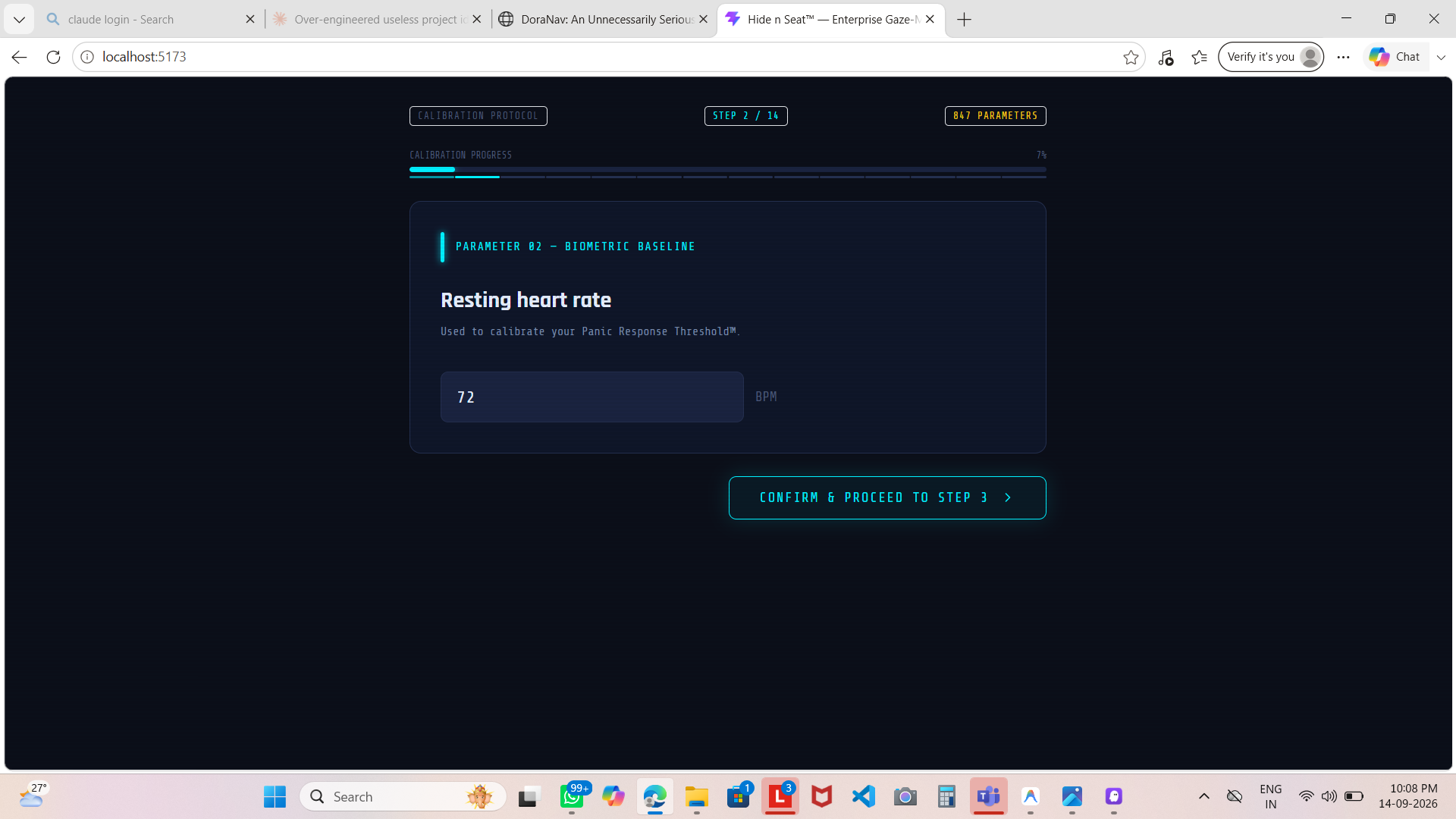
Over engineered biometric interface
THE FEATURE WE DID NOT NEED 💀
TOTALLY NECESSARY SYSTEM

Biometric Panic Calibration

CLASSROOM 06 — RESET

Ctrl + Z Was Not Enough. 💀

For a moment, our USELESS project started looking way too professional.

“This is NOT the vibe.” 😭

So instead of fixing it…

WE DELETED THE WHOLE THING. 🗑️

All the fancy changes.
All the unnecessary features.
Everything.

Gone.

We decided to start again — from the absolute basics.

Back to square one.

We rebuilt the project step by step, implementing everything again from scratch.

And eventually…

WE REACHED THE CAMERA. 📹

The camera was back.
The project was back.

And most importantly…

THE USELESSNESS WAS BACK. 😂
CLASSROOM 07 — CAMERA REVIVAL

The Camera Got Its Act Together. 📹😂

After starting again from the basics, we finally reached the moment we were waiting for.

THE CAMERA STARTED WORKING.
PROPERLY. 😭

It began detecting people across the classroom — consistently and accurately.

And this time, it wasn’t just randomly detecting someone and pretending it knew what was happening. 💀

It was detecting everyone and calculating their visibility percentages.

DETECT
TRACK
CALCULATE
DISPLAY
No guessing.
No random detections.
No “trust me, I saw someone.” 😭
USELESS WAS OFFICIALLY
BACK ON TRACK. 🚀
CLASSROOM 08 — EMOJI EXPERIMENT

Numbers Were Too Boring. 😭

The camera was finally working.

Everyone was getting detected.

The visibility scores were showing.

Everything was technically going great…

But there was one problem.

THE PERCENTAGES WERE BORING. 💀

So we thought:

“Why show boring numbers when we can make this way more dramatic?”

And that’s when we decided to replace the percentages with emojis.

😎 — You’re safe.
👀 — Teacher might notice you.
💀 — Good luck.

And while implementing it…

THINGS GOT WAY TOO FUNNY. 😂

We realised we had gone a little too far again.

The emojis had their moment.

But we knew we had to find something that was funny without completely taking over the project.

CLASSROOM 09 — SEAT ANALYTICS

Every Seat Got a Score. 🪑📊

After the emoji experiment, we went back to what actually mattered:

THE SEATS.

Instead of just showing a score for each person, we decided to make every seat part of the game.

So we started giving every seat its own score out of 100.

Suddenly, the classroom became a leaderboard.

Live camera detection overlay
LIVE VISIBILITY DETECTION
SCREEN 01 / LIVE SEAT MAP CLICK A SEAT TO SCAN
Select a seat to scan its visibility.
Seat 01 — 82/100
Seat 02 — 47/100
Seat 03 — 91/100
Seat 04 — 23/100 💀

Now you could actually compare seats and see which ones were safer and which ones were basically asking to get caught.

THE LOWER THE SCORE…
THE BETTER YOUR HIDING SPOT. 😎

And that’s when the project started getting genuinely interesting.

We weren’t just detecting people anymore.

WE WERE RANKING THE CLASSROOM ITSELF. 🪑🏆
CLASSROOM 10 — SCREEN 02

Meanwhile… We Had Another Screen to Build. 👀

Just when we thought the first screen was finally under control…

WE DECIDED TO BUILD A SECOND ONE. 😭

This time, we started working on our Second Screen.

The camera came back into action, detecting people as they entered the classroom.

Camera: “Oh, you’re back?” 📹💀

As soon as someone was detected, the second screen would kick in and start the next part of the experience.

It was no longer just about who can be seen.

NOW WE HAD TO FIGURE OUT:
“WHERE ARE YOU GOING TO SIT?” 🪑👀

And that’s where our Musical Chairs-style seat selection system started coming to life.

CLASSROOM 11 — SOUNDTRACK

And Then… We Added Music. 🎵💀

The second screen was working.

The camera was detecting people.

The seat-selection system was coming together.

But something was missing…

DRAMA.

So naturally, we added music. 😭

We added a 10-second music clip to Screen 2.

The moment the camera detects someone…

🎵 MUSIC STARTS.

For the next 10 seconds, the camera keeps detecting and tracking the person while the music plays.

Why 10 seconds?

Honestly…
because 10 seconds was enough to build suspense. 😂
WALK IN → CAMERA DETECTS YOU →
MUSIC STARTS → 10 SECONDS → RANDOM SEAT. 🪑💀

At this point, even choosing a classroom seat had its own soundtrack.

CLASSROOM 12 — PLAY IT

Pick Your Seat… If You Dare. 🪑🎵

A person enters.

Camera detects them. 👀

And immediately…

🎵 THE MUSIC STARTS.
SCREEN 02 — MUSICAL SEAT SIMULATOR
10
Press START to enter the classroom.
YOUR ASSIGNED SEAT

SEAT 07

47

The teacher has definitely seen you.

For the next 10 seconds, the camera keeps detecting and tracking the person while the music plays.

Then the music stops.

Silence.

YOUR RANDOM SEAT HAS ARRIVED.

You get a choice.

YES → Congratulations. That's your seat. Good luck. 😭

NO → Okay… we'll give you another chance.

But reject two seats…

and even the algorithm gives up on you. 💀
CLASSROOM 13 — THE END

And Somehow… We Actually Built It. 🥹

After all the experiments, failed ideas, rewrites, deleted features, and way too many “let’s try this” moments…

WE FINALLY BUILT WHAT WE IMAGINED BACK IN CLASSROOM 01.

The idea that started with Sara and Darsana simply noticing students hiding from the teacher had finally turned into a working system.

📹 Camera Detection
📊 Visibility Scoring
🪑 Seat Ranking
🎵 Musical Chairs Experience
🎲 Random Seat Selection
💀 CHAOS

And after going back to the basics, rebuilding everything, changing things we didn’t like, and adding the features we actually wanted…

USELESS FINALLY LOOKED LIKE
THE PROJECT WE IMAGINED.

Sara and Darsana looked at it and thought:

“Yep. This is exactly what we wanted.” 🥹
FROM A RANDOM CLASSROOM OBSERVATION…

TO 13 CLASSROOMS OF ABSOLUTE USELESSNESS.

And honestly?

WE’RE HAPPY WE BUILT IT. ❤️
PROJECT HIDE & SEAT
COMPETITION ThinkerHub — USELESS Project 3.0
CREATED BY Sara & Darsana
BUILT WITH HTML · CSS · JavaScript · Computer Vision
CLASS DISMISSED. 🔔
```